Turn long recordings into polished highlight reels, recaps, and social videos through conversational AI editing.


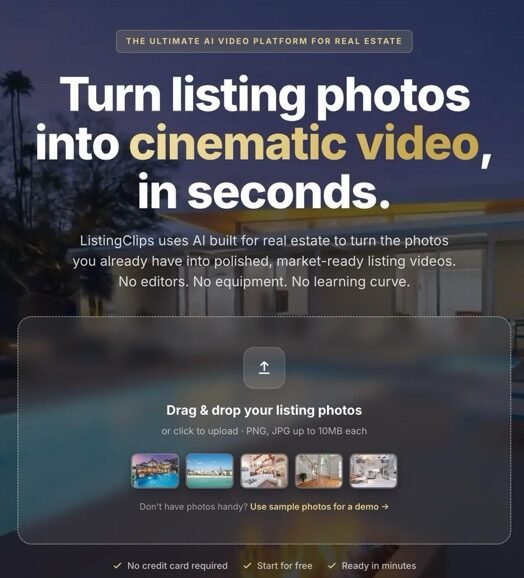
ListingClips is an AI-powered video creation platform designed specifically for real estate professionals. It transforms existing property listing photos into cinematic video clips without requiring a traditional video shoot, specialized equipment, or advanced editing software.
The platform is built around real estate marketing workflows, allowing agents, photographers, brokerages, and agencies to turn still property photography into videos suitable for listing pages, social media, email campaigns, and other promotional channels.
ListingClips uses AI to add cinematic motion to static property photographs. Users upload the photos they already have and select how each image should move. The platform then generates animated clips that can be combined into a complete property video.
This workflow allows real estate professionals to create video content from existing photography rather than arranging a separate video production session.
ListingClips provides a selection of camera movements designed for property presentation. Available movements include push in, push out, orbit left, orbit right, pan left, pan right, push in with orbit, rise and tilt, and vertical rise effects.
Movements can be selected individually for different photographs or applied across multiple images through batch processing.
In addition to camera motion, ListingClips includes atmospheric effects that can change the appearance or mood of a property image. Available effects include Day to Night, Drifting Clouds, Galaxy Sky, Season Change, and Timelapse.
These effects can provide additional visual variations for property marketing content while keeping the workflow based on existing listing photography.
Users can upload multiple listing photographs at once, including interior, exterior, twilight, and aerial images. ListingClips supports both horizontal and vertical photos, making it possible to prepare different types of property content within the same project.
The Create Video feature provides a faster way to assemble a finished property video. Users can arrange their clips, select music and video format settings, and generate a complete video with a single workflow.
The automatic process can handle clip ordering, music, resolution, orientation, and clip length, reducing the amount of manual editing required.
For users who want more control, ListingClips includes a timeline-based video editor. Clips can be reordered, trimmed, and adjusted directly within the platform.
The editor also supports voiceovers, music, text, and caption layers, allowing users to finish their listing videos without moving the project into separate editing software.
ListingClips supports AI voiceovers as part of its video creation workflow. Users can combine voiceover audio with music, text, and captions to create more structured property presentations.
These elements can be arranged alongside generated video clips within the built-in editor.
ListingClips supports horizontal, square, and vertical formats. The vertical 9:16 format is designed for short-form platforms and can be used for social media reels, stories, and other vertical video placements.
Horizontal 16:9 output can be used for property presentations, YouTube content, listing pages, and other wider video placements.
Paid plans support 1080p exports without a watermark. The free Open House plan provides 720p exports with a watermark, allowing users to test the platform before upgrading.
Completed videos can be downloaded for use across listing pages, social media, email campaigns, and other marketing channels.
ListingClips is designed around the needs of real estate agents, photographers, brokerages, and agencies. The workflow begins with existing property photos and continues through animation, editing, video assembly, and export.
This approach allows professionals who already produce property photography to add video content without introducing a separate production workflow.
Agents can use ListingClips to create property videos from their listing photography. The platform supports both complete property videos and shorter vertical content for social media marketing.
The free plan provides an option to experiment with the workflow before moving to paid plans with higher credit allowances and 1080p exports.
Real estate photographers can use ListingClips to add video deliverables to photography workflows. Existing property photographs can be converted into animated clips after the photography session, helping create additional marketing content from the same source material.
Higher-tier plans provide larger monthly credit allowances for professionals producing video content at greater volumes. Broker and Agency plans are designed for users handling multiple listings and recurring video production requirements.
ListingClips uses a credit system for video generation and voiceovers. Five credits are used to generate one clip, while voiceover generation also consumes credits.
Paid subscriptions include monthly credits, and unused subscription credits remain available even if a user cancels or changes their subscription according to the current pricing structure.
The Open House plan is free and provides 50 credits per month, up to 10 clips, and 720p exports with a watermark.
The Listing plan costs $49 per month and includes 240 credits, up to 48 clips, 1080p exports, voiceovers, horizontal and vertical photo support, watermark-free output, and access to the ListingClips Video Editor.
The Broker plan costs $129 per month and provides 645 credits, up to 129 clips, 1080p exports, voiceovers, watermark-free output, and the built-in editor.
The Agency plan costs $249 per month and provides 1,400 credits, up to 280 clips, 1080p exports, voiceovers, watermark-free output, and the built-in editor.
ListingClips is intended for real estate agents, real estate photographers, brokerages, agencies, and marketing professionals who want to produce property video content from existing listing photographs.
Users can begin by uploading their property photographs. They can then choose camera movements and atmospheric effects, generate clips, arrange the results, add music or voiceover, and export the finished video.
The platform provides a free plan without requiring a credit card, allowing users to create initial videos before selecting a paid subscription.
ListingClips transforms real estate listing photos into cinematic video clips using AI-powered camera movements and visual effects. The generated clips can then be assembled into complete property videos.
Yes. ListingClips offers a free Open House plan with 50 credits per month, up to 10 clips, and 720p exports with a watermark.
The first paid plan is the Listing plan at $49 per month. Higher plans are available for brokerages and agencies with larger monthly credit requirements.
Yes. ListingClips supports 9:16 vertical videos in addition to 1:1 square and 16:9 horizontal formats.
Yes. The platform is designed to transform existing property listing photographs into animated video clips, so users do not need to begin with newly recorded video footage.
Yes. Paid plans include access to the ListingClips Video Editor, which provides a timeline for arranging and trimming clips and adding voiceovers, music, text, and captions.
Yes. Voiceovers are available on paid plans and can be combined with music, captions, and other layers in the built-in editor.
Free exports are available in 720p with a watermark. Paid plans provide 1080p exports without a watermark.
ListingClips is designed for real estate agents, photographers, brokerages, agencies, and other professionals who create marketing content for property listings.
A specific public launch date is not publicly disclosed. The domain listingclips.com was registered on March 31, 2025.
There are no reviews yet. Be the first one to write one.
Share Your Experience:
Turn long recordings into polished highlight reels, recaps, and social videos through conversational AI editing.

Turn ideas into complete AI videos with editable scenes, generated visuals, voice, and music.

Create AI videos, images, and voiceovers using leading models in one creative workspace.
Showcase your AI Tool – Add it to our directory today.